Chapter 6 of 1235 min
Platforms and collisions
- Game loop
- Player
- Platforms
- Level
- Camera
- Coins
- Enemies
- Online
In this chapter you will:
- turn the single ground into a list of solid walls
- stop the player walking through walls, from any side
- learn the trick almost every 2D game uses: move one direction at a time
A list of walls
One ground rectangle isn't a level. Replace the ground line with a list, and start the player on the left:
player = pygame.Rect(20, 320, 30, 40)
walls = [
    pygame.Rect(0, 360, 320, 120),
    pygame.Rect(440, 360, 360, 120),
    pygame.Rect(80, 260, 120, 40),
    pygame.Rect(540, 240, 160, 40),
    pygame.Rect(720, 280, 40, 80),
]
Two pieces of ground with a gap between them, two floating platforms, and a short pillar. All are "walls": solid rectangles.
The problem with walls
With one ground, "overlapping means put it on top" was enough. Now the player can hit a wall from the side, or bump its head on a platform from below. When you find an overlap, how do you know which way to push the player out?
The trick: move in one direction at a time.
- Move sideways. If you now overlap a wall, you must have walked into its side, so push the player back out sideways.
- Then move up or down. If you now overlap a wall, you must have landed on it or hit it from below, so push the player out up or down.
Because each step moves in only one direction, the direction tells you exactly how to push back.
Write it
Replace the whole update step with this:
    # 2. Update
    keys = pygame.key.get_pressed()
    x_speed = 0
    if keys[pygame.K_LEFT]:
        x_speed = -SPEED
    if keys[pygame.K_RIGHT]:
        x_speed = SPEED

    # Move sideways, then push out of any wall we walked into
    player.x += x_speed
    for wall in walls:
        if player.colliderect(wall):
            if x_speed > 0:
                player.right = wall.left
            if x_speed < 0:
                player.left = wall.right

    # Fall, then push out of any wall we landed on or bumped into
    y_speed += GRAVITY
    player.y += y_speed
    on_ground = False
    for wall in walls:
        if player.colliderect(wall):
            if y_speed > 0:
                player.bottom = wall.top
                on_ground = True
            if y_speed < 0:
                player.top = wall.bottom
y_speed = 0- The arrow keys now set
x_speedinstead of moving the player straight away, so the code knows which way the player was going. - Moving right into a wall: put the player's right edge against the wall's left edge. Moving left: the other way round.
- Falling (
y_speed > 0) into a wall: stand on it. Rising (y_speed < 0) into one: the head stops at its bottom. Either way, the vertical speed becomes 0.
And draw every wall, in place of the ground:
    for wall in walls:
        pygame.draw.rect(screen, (90, 160, 70), wall)
python main.pyJump onto the platforms, walk into the pillar, and jump the gap.
You should see
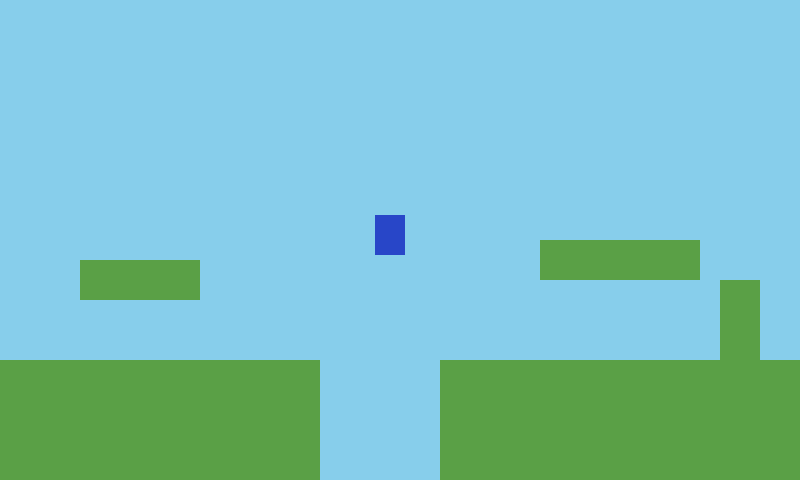
If you fall into the gap, you'll fall forever: restart with the close button. Chapter 10 turns that into "game over".
Predict, then check
Stand under a floating platform and jump. What happens, and which line of code does it?
Show answerHide answer
Your head bumps the platform and you drop straight back down. On the way up, y_speed is negative, so player.top = wall.bottom puts you just under the platform, and y_speed = 0 kills the jump. Gravity does the rest.
Practice
Add a platform of your own high up in the top-left corner, and climb onto it.
Show a solution
One more rectangle in the list:
pygame.Rect(0, 160, 80, 40),A jump rises 120 pixels, but you need some to spare to get over a platform's edge, so you can land on things up to about 100 pixels higher than you. This platform's top is exactly 100 pixels above the platform at y = 260. Get onto that lower platform first (jump onto it from its right-hand end), walk to its left end, then jump while holding left. If you can't reach a platform of yours, move it down.
Save your progress
git add .
git commit -m "Chapter 6: platforms and collisions"
Stuck, or want to compare? The finished code for this chapter is tagged ch06: run git diff ch06, or see it on GitHub.