Chapter 10 of 1245 min
Enemies, winning and losing
- Game loop
- Player
- Platforms
- Level
- Camera
- Coins
- Enemies
- Online
In this chapter you will:
- add enemies that patrol, and that you can stomp
- add a flag to reach, and a way to lose
- give the game a state, so it knows whether you're playing, have won or have lost
After this chapter, Pixel Run is a complete game.
Two more letters
E is an enemy and F is the flag at the end. Replace LEVEL once more:
LEVEL = [
    "                                                            ",
    "                                                            ",
    "                                                            ",
    "                                                            ",
    "                              C  C                          ",
    "                              ####                          ",
    "            C C            CC           C C C               ",
    "            ###            ##                               ",
    "  P                        ##               E      E    F   ",
    "######  ############  ############   #######################",
    "######  ############  ############   #######################",
    "######  ############  ############   #######################",
]
Load enemies and the flag
An enemy needs more than a rectangle: it moves, so it needs a speed, and it patrols around the place it started, so it needs to remember that too. A dictionary holds all three. Update load_level:
def load_level():
    walls = []
    coins = []
    enemies = []
    for row, line in enumerate(LEVEL):
        for col, letter in enumerate(line):
            x = col * TILE
            y = row * TILE
            if letter == "#":
                walls.append(pygame.Rect(x, y, TILE, TILE))
            elif letter == "C":
                coins.append(pygame.Rect(x + 12, y + 12, 16, 16))
            elif letter == "E":
                enemies.append({"rect": pygame.Rect(x, y + 10, TILE, 30), "speed": 2, "start_x": x})
            elif letter == "P":
                start = (x, y)
            elif letter == "F":
                flag = pygame.Rect(x + 15, y - 40, 10, 80)
    return walls, coins, enemies, start, flag
The flag is a thin pole, 80 pixels tall, standing on the ground.
The game's state
A finished game is in one of a few situations: being played, won, or lost. Each needs different behaviour: you can't move after you've lost, and pressing R should only restart once the game is over. So keep one variable, state, that says which situation you're in:
state | What happens |
|---|---|
"new" | Build the level, put the player at the start, then switch to "playing" |
"playing" | The normal game: move, collide, collect |
"won" or "lost" | Everything stops, a message shows, R goes back to "new" |
This idea, a variable for the situation and rules for moving between situations, is called a state machine. Menus, pause screens and levels in bigger games all work this way.
Start (and restart) inside the loop
Restarting means doing the setup again. So move the setup into the loop, as the "new" state. Delete these lines from above the loop:
walls, coins, start = load_level()
player = pygame.Rect(start[0], start[1], 30, 40)
y_speed = 0
on_ground = False
score = 0
Just above running = True, add state = "new", and make this the first thing inside the loop:
while running:
    # 0. A new game: build the level and put the player at the start
    if state == "new":
        walls, coins, enemies, start, flag = load_level()
        player = pygame.Rect(start[0], start[1], 30, 40)
        y_speed = 0
        on_ground = False
        score = 0
        state = "playing"
Input: jump while playing, R to restart
    # 1. Input
    for event in pygame.event.get():
        if event.type == pygame.QUIT:
            running = False
        if event.type == pygame.KEYDOWN:
            if event.key == pygame.K_SPACE and on_ground and state == "playing":
                y_speed = JUMP_SPEED
            if event.key == pygame.K_r and state != "playing":
                state = "new"
Update only while playing
Put if state == "playing": above the update step, and indent the whole update step under it (select the lines in VS Code and press Tab). Then, still inside it, add the enemies and the two ways the game ends:
        # Enemies walk two tiles each way from where they started
        for enemy in enemies[:]:
            enemy["rect"].x += enemy["speed"]
            if abs(enemy["rect"].x - enemy["start_x"]) > 2 * TILE:
                enemy["speed"] = -enemy["speed"]
            if player.colliderect(enemy["rect"]):
                if y_speed > 0 and player.bottom < enemy["rect"].centery:
                    enemies.remove(enemy)  # landed on top: stomped!
                    y_speed = JUMP_SPEED // 2
                else:
                    state = "lost"

        if player.top > HEIGHT:
            state = "lost"
        if player.colliderect(flag):
state = "won"- Patrolling:
abs(...)is the distance from where the enemy started, ignoring left or right. Once it's more than two tiles, the speed flips sign and the enemy walks back. - Stomping: if the player is falling (
y_speed > 0) and its feet are above the middle of the enemy, it landed on top. The enemy is removed and the player bounces up with half a jump. - Any other touch, from the side or from below, and you've lost.
- Falling into a gap: once the player's top is below the bottom of the window, it's gone.
Draw the enemies, the flag and the messages
In the draw step, after the coins:
    for enemy in enemies:
        pygame.draw.rect(screen, (200, 50, 50), enemy["rect"].move(-camera_x, 0))
    pygame.draw.rect(screen, (60, 60, 60), flag.move(-camera_x, 0))
    pygame.draw.polygon(screen, (250, 120, 30), [
        (flag.right - camera_x, flag.top),
        (flag.right - camera_x + 30, flag.top + 12),
        (flag.right - camera_x, flag.top + 24),
    ])
pygame.draw.polygon joins a list of points into a shape; three points make the triangle of the flag.
And after the score:
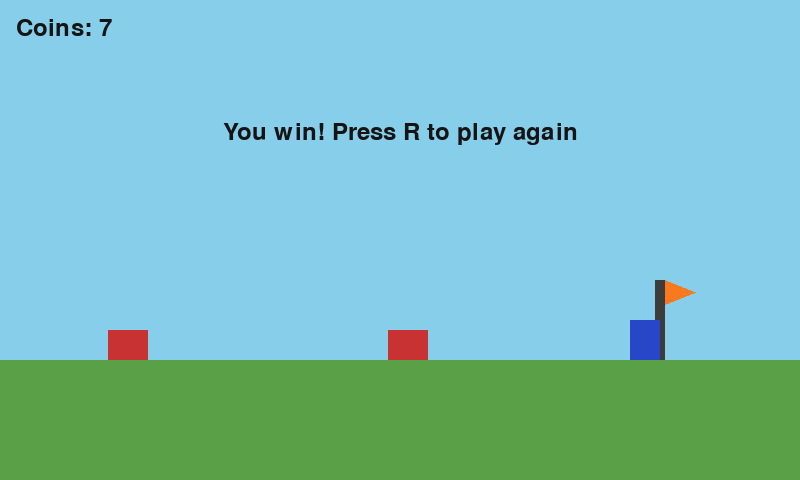
    if state == "won":
        text = font.render("You win! Press R to play again", True, (20, 20, 20))
        screen.blit(text, (WIDTH // 2 - text.get_width() // 2, 120))
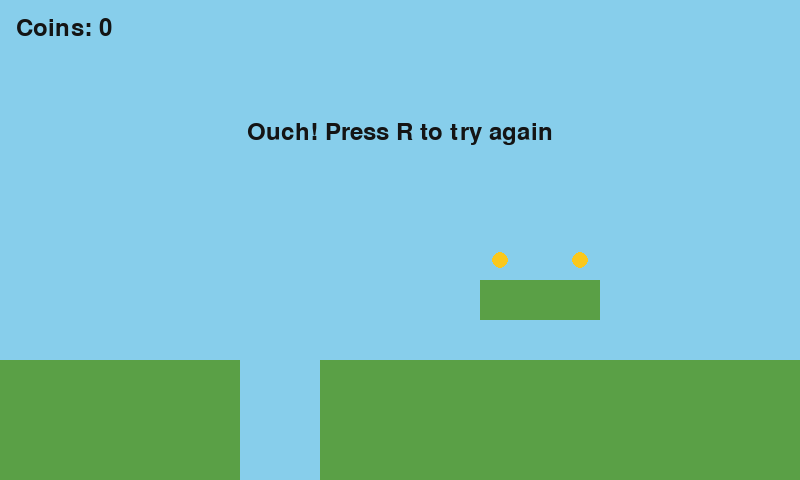
    if state == "lost":
        text = font.render("Ouch! Press R to try again", True, (20, 20, 20))
        screen.blit(text, (WIDTH // 2 - text.get_width() // 2, 120))
WIDTH // 2 - text.get_width() // 2 centres the message: half the window, minus half the text's width.
Compare with the whole main.py
import pygame

WIDTH = 800
HEIGHT = 480
TILE = 40
SPEED = 5
GRAVITY = 1
JUMP_SPEED = -16

LEVEL = [
    "                                                            ",
    "                                                            ",
    "                                                            ",
    "                                                            ",
    "                              C  C                          ",
    "                              ####                          ",
    "            C C            CC           C C C               ",
    "            ###            ##                               ",
    "  P                        ##               E      E    F   ",
    "######  ############  ############   #######################",
    "######  ############  ############   #######################",
    "######  ############  ############   #######################",
]


def load_level():
    walls = []
    coins = []
    enemies = []
    for row, line in enumerate(LEVEL):
        for col, letter in enumerate(line):
            x = col * TILE
            y = row * TILE
            if letter == "#":
                walls.append(pygame.Rect(x, y, TILE, TILE))
            elif letter == "C":
                coins.append(pygame.Rect(x + 12, y + 12, 16, 16))
            elif letter == "E":
                enemies.append({"rect": pygame.Rect(x, y + 10, TILE, 30), "speed": 2, "start_x": x})
            elif letter == "P":
                start = (x, y)
            elif letter == "F":
                flag = pygame.Rect(x + 15, y - 40, 10, 80)
    return walls, coins, enemies, start, flag


pygame.init()
screen = pygame.display.set_mode((WIDTH, HEIGHT))
pygame.display.set_caption("Pixel Run")
clock = pygame.time.Clock()
font = pygame.font.Font(None, 36)


level_width = len(LEVEL[0]) * TILE
state = "new"
running = True

while running:
    # 0. A new game: build the level and put the player at the start
    if state == "new":
        walls, coins, enemies, start, flag = load_level()
        player = pygame.Rect(start[0], start[1], 30, 40)
        y_speed = 0
        on_ground = False
        score = 0
        state = "playing"

    # 1. Input
    for event in pygame.event.get():
        if event.type == pygame.QUIT:
            running = False
        if event.type == pygame.KEYDOWN:
            if event.key == pygame.K_SPACE and on_ground and state == "playing":
                y_speed = JUMP_SPEED
            if event.key == pygame.K_r and state != "playing":
                state = "new"

    # 2. Update
    if state == "playing":
        keys = pygame.key.get_pressed()
        x_speed = 0
        if keys[pygame.K_LEFT]:
            x_speed = -SPEED
        if keys[pygame.K_RIGHT]:
            x_speed = SPEED

        # Move sideways, then push out of any wall we walked into
        player.x += x_speed
        for wall in walls:
            if player.colliderect(wall):
                if x_speed > 0:
                    player.right = wall.left
                if x_speed < 0:
                    player.left = wall.right

        # Fall, then push out of any wall we landed on or bumped into
        y_speed += GRAVITY
        player.y += y_speed
        on_ground = False
        for wall in walls:
            if player.colliderect(wall):
                if y_speed > 0:
                    player.bottom = wall.top
                    on_ground = True
                if y_speed < 0:
                    player.top = wall.bottom
                y_speed = 0

        # Coins
        for coin in coins[:]:
            if player.colliderect(coin):
                coins.remove(coin)
                score += 1

        # Enemies walk two tiles each way from where they started
        for enemy in enemies[:]:
            enemy["rect"].x += enemy["speed"]
            if abs(enemy["rect"].x - enemy["start_x"]) > 2 * TILE:
                enemy["speed"] = -enemy["speed"]
            if player.colliderect(enemy["rect"]):
                if y_speed > 0 and player.bottom < enemy["rect"].centery:
                    enemies.remove(enemy)  # landed on top: stomped!
                    y_speed = JUMP_SPEED // 2
                else:
                    state = "lost"

        if player.top > HEIGHT:
            state = "lost"
        if player.colliderect(flag):
            state = "won"

    # 3. Draw
    camera_x = player.centerx - WIDTH // 2
    camera_x = max(0, min(camera_x, level_width - WIDTH))

    screen.fill((135, 206, 235))
    for wall in walls:
        pygame.draw.rect(screen, (90, 160, 70), wall.move(-camera_x, 0))
    for coin in coins:
        pygame.draw.ellipse(screen, (250, 200, 30), coin.move(-camera_x, 0))
    for enemy in enemies:
        pygame.draw.rect(screen, (200, 50, 50), enemy["rect"].move(-camera_x, 0))
    pygame.draw.rect(screen, (60, 60, 60), flag.move(-camera_x, 0))
    pygame.draw.polygon(screen, (250, 120, 30), [
        (flag.right - camera_x, flag.top),
        (flag.right - camera_x + 30, flag.top + 12),
        (flag.right - camera_x, flag.top + 24),
    ])
    pygame.draw.rect(screen, (40, 70, 200), player.move(-camera_x, 0))

    text = font.render("Coins: " + str(score), True, (20, 20, 20))
    screen.blit(text, (16, 16))
    if state == "won":
        text = font.render("You win! Press R to play again", True, (20, 20, 20))
        screen.blit(text, (WIDTH // 2 - text.get_width() // 2, 120))
    if state == "lost":
        text = font.render("Ouch! Press R to try again", True, (20, 20, 20))
        screen.blit(text, (WIDTH // 2 - text.get_width() // 2, 120))

    pygame.display.flip()
    clock.tick(60)

pygame.quit()
python main.pyPlay it to the flag. Then fall into a gap on purpose, and press R.
You should see
Predict, then check
Why does the stomp check need y_speed > 0? What would happen without it?
Show answerHide answer
Without it, jumping up into an enemy from below could count as a stomp, as long as your feet were briefly above its middle. y_speed > 0 means falling, and you can only land on something while falling.
Practice
Add a fast enemy, as a new letter: e (lower case) walks at speed 4 instead of 2. Put one in the level.
Show a solution
One more elif in load_level:
            elif letter == "e":
                enemies.append({"rect": pygame.Rect(x, y + 10, TILE, 30), "speed": 4, "start_x": x})
Then change one E in the level to e. Nothing else changes: the update and draw code already work for any enemy in the list.
Save your progress
git add .
git commit -m "Chapter 10: enemies, winning and losing"
Stuck, or want to compare? The finished code for this chapter is tagged ch10: run git diff ch10, or see it on GitHub.